Endpoint Backup - Windows
Windows-Sicherungssoftware für umfassende, einheitliche Kontinuität
Datto Endpoint Backup für Windows ist eine Cloud-basierte Backup- und Wiederherstellungslösung, die zuverlässigen, geräteunabhängigen Schutz für Windows-PCs, Server, virtuelle Maschinen (VMs) und Cloud-Instanzen bietet. Sie wird sicher über die einheitliche Datto-Plattform verwaltet und ist die ideale Lösung für MSPs und IT-Abteilungen, die Remote-Geräte verwalten.
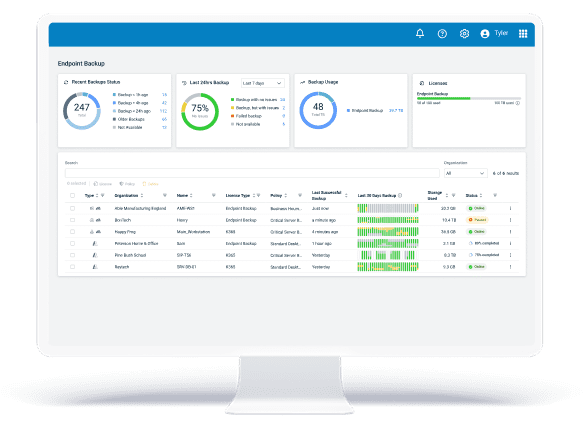
Vereinfachter Schutz für jeden Windows-Endpunkt
Bieten Sie nahtlose Backups und Wiederherstellungen für jeden Windows-basierten Endpunkt, von jedem Ort aus. Verbessern Sie die Kontrolle über Ihre Backup-Prozesse, stellen Sie in jeder Situation sicher wieder her, skalieren Sie Ihre Datensicherung mühelos und maximieren Sie die Rendite Ihrer Investition.

Verwalten Sie Ihre Backups mit maximaler Flexibilität
Übernehmen Sie die volle Kontrolle über Ihre Windows-Backups mit anpassbaren Richtlinien, die festlegen, welche Daten gesichert werden sollen, wann sie gesichert werden sollen, wo sie gespeichert werden sollen und wie lange sie aufbewahrt werden sollen. Konfigurieren Sie jedes Detail des Backup-Prozesses, um Ihre Daten nach Ihren Vorstellungen zu schützen.
Schnelle und zuverlässige Wiederherstellung aus jedem Szenario
Optimieren Sie die Wiederherstellung einzelner Dateien und Ordner, um Daten von einem bestimmten Zeitpunkt an schnell wiederherzustellen, oder führen Sie eine Bare Metal Restore (BMR) auf derselben oder einer anderen Hardware durch, um ein ganzes System nach einem katastrophalen Verlust oder Geräteausfall wiederherzustellen.
Skalieren Sie Ihren Betrieb mit Leichtigkeit und Effizienz
Stimmen Sie die Backup-Konfigurationen Ihrer Kunden oder Ihres Unternehmens aufeinander ab, indem Sie richtlinienbasiertes Management mit zielgerichteten, schlüsselfertigen RMM-, GPO- und Intune-Integrationen kombinieren, die eine automatische, unbeaufsichtigte Bereitstellung des Backup-Agenten auf jedem Windows-Endpunkt ermöglichen.
Steigern Sie die Rentabilität mit einer kosteneffizienten Lösung
Erzielen Sie einen höheren ROI für Ihr MSP-Geschäft oder entlasten Sie Ihr IT-Budget mit einer Lösung, die die branchenweit besten Gewinnspannen bietet und erschwinglich ist. Profitieren Sie von den niedrigen Anschaffungskosten und einem Preismodell, mit dem Sie nur für das bezahlen, was Sie benötigen.
Warum sollten Sie Ihre Windows-Endpunkte sichern?
Schützen Sie die Windows-Endpunktdaten Ihrer Kunden oder Ihres Unternehmens vor Verlust und Kontinuitätsbedrohungen wie Ransomware, versehentlichem oder böswilligem Löschen, Benutzerfehlern, Hardwareausfällen, Geräteverlust oder Naturkatastrophen.
Laden Sie ein kostenloses Exemplar unseres eBooks "Auswahl der richtigen Endpoint Backup-Lösung" herunter, um Missverständnisse in Bezug auf die Datensicherung von Endgeräten zu klären und wichtige Faktoren zu entdecken, die bei der Auswahl einer Windows-Backup-Lösung zu berücksichtigen sind.
eBook herunterladen
Modernisieren Sie Ihre Windows-Backup-Strategie
Nutzen Sie die Sicherungs- und Wiederherstellungstechnologie, mit der Sie Windows-Endpunkte auf Ihre Weise schützen können, mit integrierten Sicherheitsstandards zur Unterstützung einer unübertroffenen Datenkontinuität und vorgefertigten Integrationen für reibungslose, effiziente Arbeitsabläufe.
Richtliniengesteuerte Backup-Automatisierung
Konfigurieren Sie Ihre Sicherungsrichtlinien, um alle Aspekte anzupassen und zu steuern – von der Datenauswahl und der Sicherungshäufigkeit bis hin zu Aufbewahrungsfristen und Bandbreitennutzung:
- Selektive Datensicherung: Definieren Sie Regeln für die Einbeziehung bzw. den Ausschluss nach Anwendung, Benutzerprofil, Datenträger und Dateityp
- Individuelle Zeitplanung: Legen Sie mit der intelligenten Zeitplanung Sicherungsintervalle fest – von einmal bis alle 24 Stunden
- Aufbewahrungsfristen: Passen Sie die Richtlinien so an, dass Sicherungsdaten 90 Tage, 1 Jahr, 3 Jahre oder 7 Jahre lang aufbewahrt werden.
- Datenbegrenzung: Verbindungsbeschränkungen anwenden, um Störungen der Produktionsabläufe zu verhindern
Vielseitige Wiederherstellungsfunktionen
Legen Sie fest, was wiederhergestellt werden soll, wo und wie die Wiederherstellung erfolgen soll und wer dazu berechtigt ist. Stellen Sie alles wieder her – von einzelnen Dateien bis hin zu kompletten Windows-Systemen:
- Wiederherstellung von Dateien und Ordnern: Stellen Sie eine einzelne Datei, mehrere Dateien und Ordner oder die gesamte Ordnerstruktur wieder her
- Alle Versionen in einer Datei: Dateien am ursprünglichen Zielort, an einem alternativen Zielort oder per direktem Download wiederherstellen
- Wiederherstellungsort: Beschleunigen Sie die Geschäftskontinuität, indem Sie Daten nach einem Sicherheitsvorfall in einem neu erstellten Mandanten wiederherstellen
- Bare-Metal-Wiederherstellung (BMR): Wiederherstellung kompletter Systeme, einschließlich Betriebssystem, Daten, Anwendungen und Konfigurationen
Datenschutz nach Industriestandard
Schützen Sie Ihre Windows-Backups mit Verschlüsselung auf Unternehmensniveau, sicheren Zugriffsverwaltungsprotokollen und der bewährten Zuverlässigkeit der Datto Cloud:
- End-to-End-Verschlüsselung: Backups werden sowohl während der Übertragung als auch im Ruhezustand verschlüsselt, wobei optional vom Kunden verwaltete Schlüssel verwendet werden können
- Mehrfaktor-Authentifizierung (MFA): Obligatorische MFA für das Admin-Verwaltungsportal, um einen verifizierten Zugriff zu gewährleisten
- Single Sign-On (SSO): Zugriff über SSO vom KaseyaOne-Portal aus für sichere, vorab autorisierte Anmeldungen
- Unveränderliche Datto-Cloud: Alle Daten werden in einer Cloud gespeichert, die so konzipiert ist, dass unerwünschte Änderungen oder Löschungen verhindert werden
Native, optimierte Integration
Nutzen Sie sofort einsetzbare Integrationen mit bekannten MSP-Lösungen, die Problemlösung, Bereitstellung, Asset-Tracking und Compliance-Dokumentation vereinfachen:
- PSA-Integration: Automatisches Erstellen und Schließen von Tickets für Backup-Probleme mithilfe der „ Autotask PSA “-Integration
- RMM-Integration: Automatisieren Sie die Bereitstellung von jedem Standort aus mithilfe der Integration von „ Datto RMM “ und „ Kaseya “ mit VSA
- Integration von Dokumentationen: Automatische Synchronisierung des Backup-Status verwalteter Assets über die IT Glue-Integration
- Compliance-Integration: Automatische Erstellung von Nachweisen zur Einhaltung der Vorschriften mithilfe der GRC-Integration von Compliance Manager

Erfahren Sie mehr über Datto Endpoint Backup für Windows
Datto „ Endpoint Backup “ für Windows hilft MSPs dabei, ihr Umsatzwachstum anzukurbeln, und unterstützt die Nachhaltigkeit von IT-Organisationen, während es gleichzeitig verbesserte Transparenz, Flexibilität und Einfachheit bietet. Laden Sie das Datenblatt für Ihren Anwendungsfall herunter, um mehr zu erfahren.
Warum Datto für Ihr Windows-Backup?
Direkt-zu-Cloud-Sicherung
Stellen Sie ein automatisiertes, anwendungsfreies Backup für Windows-Endgeräte bereit, das einfach zu verwalten ist, die Arbeitsbelastung für Administratoren und Endbenutzer minimiert und keine zusätzlichen Komponenten erfordert.
Zentralisierte Verwaltung
Erhalten Sie zeitnahe Warnmeldungen und verfolgen Sie per Fernzugriff den Backup-Status, den Verlauf, die Speichernutzung und die Richtlinienkonfigurationen für alle Windows- und Mac-Endgeräte über ein einheitliches Backup-Portal.
Globale Cloud-Infrastruktur
Erzielen Sie geografische Redundanz, indem Sie Backups in mehreren verfügbaren Regionen speichern, und erfüllen Sie die Anforderungen an Compliance und Datensouveränität, indem Sie den genauen Speicherort wählen.
Verbrauchsabhängiges Preismodell
Nutzen Sie die Vorteile der verbrauchsabhängigen Abrechnung, die es Ihnen ermöglicht, nur für den benötigten Speicherplatz zu zahlen, was die Gewinnspanne für MSPs erhöht und für Unternehmen erschwinglich bleibt.
Sind Sie bereit, Ihre Windows-Endpunkte mit Datto zu schützen?
Datto Endpoint Backup für Windows wurde entwickelt, um die Komplexität der Sicherung moderner Workloads zu bewältigen und ist eine bewährte Lösung für Ihre Datensicherungsanforderungen. Fordern Sie noch heute eine Live-Demo an, um loszulegen.
Häufig gestellte Fragen zur Windows-Sicherung
Windows-Backup bezieht sich auf den Prozess des Kopierens und Bewahrens von Dateien, Einstellungen oder ganzen Systemkonfigurationen von Windows-basierten Geräten wie PCs, Servern, VMs und Cloud-Instanzen, damit sie im Falle einer Beschädigung wiederhergestellt werden können. Dieser Prozess wird meist über native Windows-Tools oder Lösungen von Drittanbietern durchgeführt, die erweiterte Funktionen bieten.
Die Implementierung regelmäßiger Windows-Backups ist für die Gewährleistung der betrieblichen Ausfallsicherheit, den Schutz wichtiger Daten und die Aufrechterhaltung der Benutzerproduktivität unerlässlich. Für MSPs und IT-Teams bieten moderne Windows-Backup-Lösungen eine zentrale Steuerung, Automatisierung und flexible Wiederherstellungsoptionen, die die Verwaltung von Netzwerkendpunkten vereinfachen.
Ja, Windows verfügt über mehrere Sicherungsprogramme, die den Benutzern zur Verfügung stehen, darunter:
- Dateiverlauf: Inkrementelle Backups für persönliche Dateien mit Versionshistorie
- Sicherung und Wiederherstellung: Legacy-Tool für Datei- und System-Image-Backups
- System-Image-Sicherung: Block-Level, vollständiges System-Image-Backup für Ihr Betriebssystem-Laufwerk
- Systemwiederherstellung: Möglichkeit zur Wiederherstellung von Systemeinstellungen und Konfigurationen
Diese integrierten Optionen sind nützlich für Einzelpersonen oder kleine Büros, die grundlegende lokale Sicherungs- und Wiederherstellungsfunktionen benötigen. Sie sind jedoch in der Regel eingeschränkt, was den Speicherort der Daten, die Fernverwaltungsoptionen und die Art der Wiederherstellung von Daten betrifft.
Für MSPs und größere Unternehmen bieten Plattformen von Drittanbietern wie Datto Endpoint Backup für Windows eine skalierbare Alternative. Mit Direct-to-Cloud-Backup, einheitlicher Cloud-Verwaltung und der Möglichkeit, einzelne Dateien oder komplette Systeme wiederherzustellen, bieten Lösungen wie Datto mehr Kontrolle und Flexibilität für die Wiederherstellung von Daten in jedem Szenario.
Der Inhalt eines Windows-Backups variiert je nach Tool, insbesondere bei Verwendung von Windows-eigenen Optionen. Der Dateiverlauf sichert persönliche Dateien, aber keine Anwendungen oder Systemeinstellungen. Sichern und Wiederherstellen kann ausgewählte Ordner und optionale vollständige Systemabbilder enthalten, während die Systemabbildsicherung das gesamte Betriebssystemlaufwerk, einschließlich Anwendungen und Einstellungen, erfasst, aber keine Wiederherstellung auf Dateiebene bietet. Die Systemwiederherstellung schließlich konzentriert sich auf Systemkonfigurationen und Treiber, schließt aber persönliche Dateien aus.
Im Gegensatz dazu bietet Datto Endpoint Backup für Windows einen umfassenderen Ansatz. Mit der Sicherung sowohl von Benutzerdaten als auch von vollständigen Systemkonfigurationen, einschließlich Dateien, Systemstatus, Anwendungen und Einstellungen, ist es das einzige Tool, das Sie für eine umfassende Sicherung und Wiederherstellung von Windows benötigen.
Die Speicherorte für Windows-Sicherungen hängen von den verwendeten Tools ab. Die Windows-Dienstprogramme (Dateiverlauf, Sichern und Wiederherstellen und Systemabbildsicherung) speichern die Daten in der Regel auf externen Laufwerken, internen sekundären Laufwerken oder im Netzwerk. Die Systemwiederherstellung speichert Wiederherstellungspunkte auf dem lokalen Systemlaufwerk, ist aber nicht für eine vollständige Sicherung gedacht.
Mit einer dedizierten Lösung wie Datto Endpoint Backup für Windows werden Backups direkt in der Datto Cloud gespeichert, die einen sicheren, unveränderlichen Speicher mit robuster Verschlüsselung und Unterstützung mehrerer Regionen bietet. Im Gegensatz zu integrierten Tools macht Datto lokale Hardware überflüssig und bietet ein zentrales Remote-Management für die flexible Wiederherstellung von Dateien oder ganzen Systemen in großem Umfang.