Endpoint Backup - macOS
Mac backup software built for ease and efficiency
Datto Endpoint Backup for macOS is an appliance-free, direct-to-cloud backup solution that offers simplified and reliable file protection for macOS devices. Whether you’re an MSP or internal IT department, you can now deliver the same proven backup to your Apple-based clients and end users that you’ve come to expect from Datto.
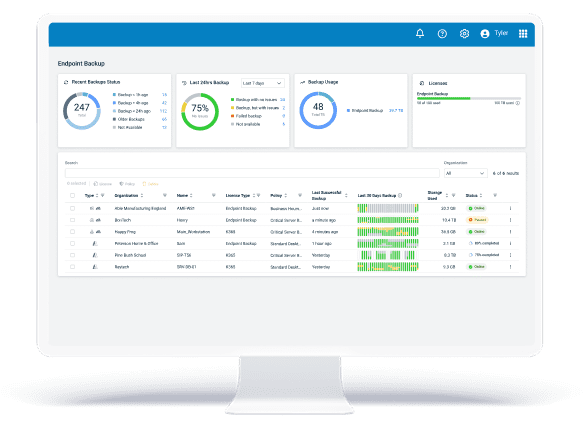
Seamlessly protect any macOS device, anywhere
Remotely deploy and administer backups for any macOS device, regardless of location. Harness greater backup flexibility, centralize backup processes under one roof, expand with ease and support a healthier bottom line for your business.

Take full control of your backup and restore
Manage your Mac backups with policy-driven configuration that covers everything from data selection and scheduling to storage location and retention. Choose exactly what to restore and where to restore it, whether it's a single file or a full restore.
Easily manage from a single, familiar platform
Unify Mac file protection with your entire backup portfolio. Manage your Mac backups, Datto appliances, SaaS protection, disaster recovery and more within the established Datto Backup platform, providing a common toolset for maximum technician efficiency.
Streamline deployment to scale effortlessly
Automate deployment of the backup agent to any device running macOS, from any location, with built-in RMM and MDM integrations. Unattended deployment requires no end-user interaction, enabling you to enforce consistent backup policies at scale, with ease.
Maximize profits with an affordable solution
Improve your margins or reduce strain on your IT budget with a low cost to entry and consumption-based billing. Only paying for what you use allows MSPs to boost profitability while clients and internal IT teams get reliable, cost-effective Mac backup.
Why back up your macOS files?
Safeguard every macOS file for your customers or organization to protect against accidental deletion, user error, device loss, hardware failure or cyberattacks like ransomware.
Download a free copy of our eBook, “Choosing the right endpoint backup solution,” for a deeper understanding of the risks facing your Mac-based endpoints and key considerations when evaluating backup options.
Download Ebook
Optimize the Mac backup and restore process
Take advantage of a solution that lets you back up and restore macOS data on your terms, employs secure protection measures to ensure data integrity and recoverability, and is purposefully integrated for a streamlined experience.
Automated, policy-based backup
Define what Mac files to back up, when and how often backups are taken, how long to retain your backups, and the amount of bandwidth dedicated to it:
- Selective backup: Set backup inclusions and exclusions by user profile, file type and volume
- Backup frequency: Customize backup windows and intervals to support recovery objectives
- Backup retention:Configure policies to keep backups for 90 days, 1 year, 3 years or 7 years
- Bandwidth throttling: Set internet connection usage limits to reduce impact on production
Fast, flexible and reliable restore
Select the Mac data you want to restore, define the level of granularity, choose the restore destination and count on differential restore for fast recovery:
- Selective restore: Recover specific files or folders, multiple items or complete folder hierarchies
- All-version file restore: Retrieve every version of a file within a chosen time range in one restore
- Restore location: Restore to the same device, a different device or download files directly
- Differential restore: Minimize recovery time by only restoring the changed blocks of a file

Enterprise-grade security protocols
Protect Mac backups with proven technology that includes end-to-end encryption, secure authentication and access standards, and the resilience of the Datto Cloud:
- Data encryption:All data encrypted in-transit and at-rest, with optional customer-managed keys
- Multifactor authentication (MFA): Forced MFA for verified access to the admin management portal
- Single sign-on (SSO): SSO from the KaseyaOne portal for pre-authenticated, secure logins
- Secure Datto cloud: Backups stored in the immutable Datto cloud to prevent data corruption
Strategic workflow integration
Utilize native integrations with popular MSP solutions that streamline and support ticketing, deployment, asset management and compliance management:
- PSA integration:Autotask PSA integration to automatically create and close tickets for backup issues
- RMM integration: Datto RMM and Kaseya VSA integration to automate remote agent deployment
- Documentation integration: IT Glue integration to auto-sync backup status with tracked assets
- Compliance integration:Compliance Manager GRC integration to automate compliance documentation

Learn more about Datto Endpoint Backup for macOS
Datto Endpoint Backup for macOS enables MSPs to achieve higher returns, is budget-friendly for IT teams and delivers greater control, flexibility and ease of use for all. Download the datasheet to get the full breakdown for your use case.
Why Datto for your macOS backup?
Appliance-free backup
Leverage automated, direct-to-cloud backup for macOS that's seamless to deploy, eliminates the need for manual intervention and requires zero additional hardware.
Unified backup portal
Get intelligent alerts and monitor every backup process across Mac and Windows endpoints with detailed overviews of backup status, history, storage and policy settings.
Multiregional presence
Maintain full control over cloud storage regions to support compliance regulations and data sovereignty requirements, and store backups across multiple sites for redundancy.
Consumption-based billing
Increase profitability for your MSP business and affordability for your clients by either pre-purchasing storage on your own terms or simply paying as you go for what you use.
Ready to start protecting your Mac files with Datto?
Built on the same dependable technology as the Datto backup portfolio, Datto Endpoint Backup for macOS is your trusted failsafe against Mac data loss. Get started today with a personalized demo.
Frequently asked questions about Mac backup
Mac backup is the process of creating secure copies of macOS files so that they can be restored in case of compromise or data loss scenarios. Backups are commonly performed using dedicated solutions (native or third-party) that provide automated backup and streamlined recovery abilities.
Regular Mac backups are critical to supporting business continuity, user productivity and data security, especially in environments with remote teams or strict compliance needs. For MSPs and businesses, centralized Mac backup enables IT teams to monitor, manage and recover data efficiently across dispersed endpoints.
macOS can back up automatically, but only once a solution has been put into place. To automatically back up Mac files, admins or users essentially have two options: Apple's built-in backup and sync tools, or a third-party solution like Datto Endpoint Backup for macOS.
Yes, Mac has built-in backup software called Time Machine. This local backup tool is best suited for personal use or small businesses, as it provides automatic, hourly incremental backups to external drives or network volumes, along with easy file or full-system restore options. The main drawback is that backups are not cloud-based, which means there is no centralized management for MSPs or IT teams overseeing remote systems.
In contrast, third-party solutions like Datto Endpoint Backup for macOS offer appliance-free, direct-to-cloud backups that are centrally managed through the Datto backup portal. Enhanced backup control, flexible restoration options, secure cloud architecture, and unified management of additional backup systems make these solutions a more attractive choice for MSPs and businesses alike.
The storage location of Mac backups depends on which solution is being used. With Time Machine, macOS stores backups locally on an external hard drive or a network-attached storage (NAS) device. These backups reside on physical media, which means they’re vulnerable to theft, damage or loss, especially in remote or distributed environments.
With Datto Endpoint Backup for macOS, backups are securely stored in the Datto Cloud. The purpose-built, immutable cloud infrastructure is protected from tampering or ransomware, with end-to-end encryption and multiregional data centers to support compliance and data sovereignty. This cloud-first approach provides greater security, scalability and centralized control for MSPs and businesses managing multiple endpoints.